
Batch Actions - Invoices
When working with a found set of invoices, you can select multiple records and apply a batch action to all of them at once.
Selecting Invoices
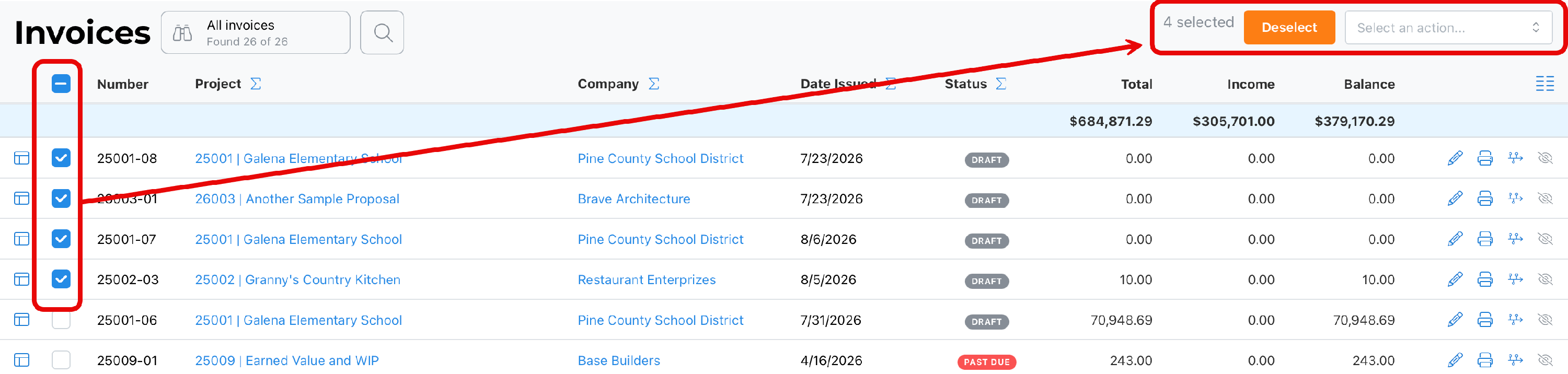
Select invoices one at a time using the checkboxes, or select all records in the found set. A live count of selected records appears in the top right, along with a Deselect button to clear your selection at any time. Once at least one invoice is selected, the Select an action... dropdown reveals the batch actions available for this module.
~ Available Actions ~
These actions may be updated from time to time. Hopefully, we will remember to keep this document current.
Hide Records
Removes the selected invoices from the current found set, without archiving, deleting, or otherwise changing the underlying records. This is useful for narrowing what you're looking at without permanently altering anything.
Change Status
Presents a dropdown list of statuses. The status selected is applied to all invoices in the current selection.
Change Date
Updates the invoice date on all selected invoices to a date you specify.
Send via Email
Sends the selected invoices to their associated client contacts by email in one batch, rather than sending each invoice individually.
Write Off Balances
Writes off the remaining unpaid balance on each selected invoice, marking that outstanding amount as uncollectible rather than expected income.
Clear Write Offs
Reverses a prior write-off on the selected invoices, restoring the previously written-off balance as an outstanding amount owed.
Void
Voids the selected invoices, removing them from active billing totals while retaining the record for historical and audit purposes.
Best Practice
Use Hide Records to narrow a large invoice list down to the ones you're focused on. Because Change Date, Write Off Balances, and Void all affect financial reporting, confirm your selection carefully before applying these in batch — particularly Void and Write Off Balances, since they change how those invoices count toward your receivables.
Summary
Select invoices individually or all at once, then choose an action from the dropdown that appears once records are selected. Use Deselect at any time to clear your current selection.