
Jumping to Related Records
BaseBuilders includes a capability many systems simply don't have: the ability to jump from any set of records you're browsing to the related records connected to them — instantly, without rebuilding a search or navigating away from your workflow.
What Jumping Does
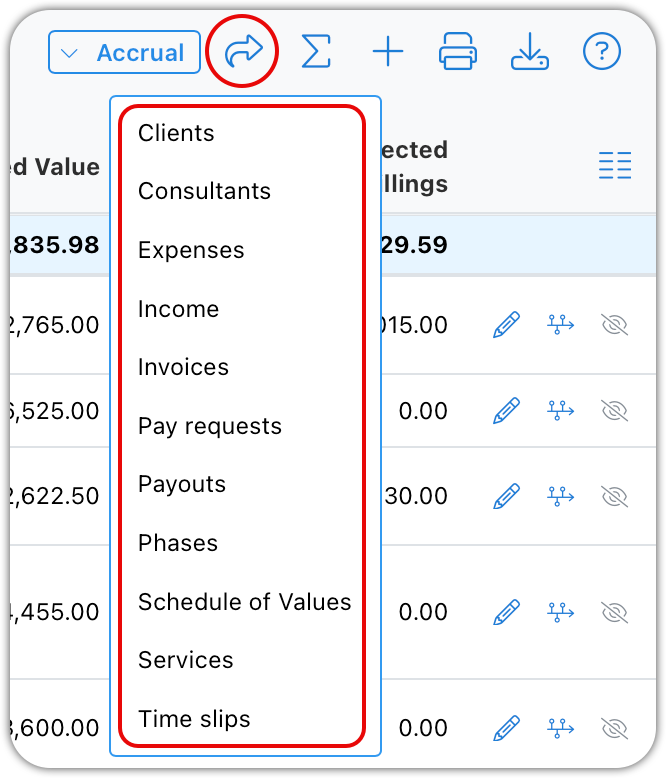
Wherever you're browsing a list view — projects, invoices, time slips, or any other record type — the Jump button lets you pivot to a related set of records based on what you're currently viewing. Instead of manually searching or filtering for those related records, BaseBuilders builds that related set for you in one click.
For example, if you're browsing a found set of projects, you can jump directly to:
- Clients tied to those projects
- Consultants working on those projects
- Expenses logged against those projects
- Income received on those projects
- Invoices billed to those projects
- Pay requests submitted by consultants on those projects
- Payouts made to consultants on those projects
- Phases across those projects
- Schedule of Values entries tied to those projects
- Services billed on those projects
- Time slips logged against those projects
Whatever set of records you start with, the Jump menu shows you every related record type you can pivot to from there.
Jumping From a Jump
The real power of this feature is that it doesn't stop at one hop. Once you've jumped to a related set of records, you can jump again — from that set to whatever's related to it.
For example:
- Start with a found set of projects you're reviewing.
- Jump to the invoices that have been billed against those projects.
- From that set of invoices, jump again to the time slips that were billed on those invoices.
Each jump carries forward the context of the records you were just looking at, so by the third step you're looking at a very specific set of time slips — only the ones tied to invoices billed on your original project list — without ever having manually built that filter yourself.
Why This Matters
Most systems require you to know in advance what you're looking for and build a search or filter to get there. Jumping flips this around: you can start broad — a client, a project list, a date range of invoices — and explore outward through the relationships between your records, refining as you go, without losing your place or starting over.
This is especially useful when you're investigating something and don't yet know exactly where the answer lives. You might start with a handful of projects for a client, jump to their invoices to see what's been billed, then jump again to time slips to see exactly whose time made up those bills — three questions answered
in three clicks, from a single starting point.
Best Practice
Think of Jump as a way to explore your data by relationship rather than by search. When you're investigating something across records — a client's billing history, a consultant's activity, or the time behind a set of invoices — start with the broadest relevant set and jump progressively narrower, rather than trying to construct a single complex search up front.
Summary
The Jump button lets you pivot from any found set of records to a related set — projects to invoices, invoices to time slips, and many other combinations — based on what you're currently browsing. Because you can jump from a jump, you can chain multiple pivots together to move from a broad starting point to a very specific, related set of records in just a few clicks, without ever rebuilding your search from scratch.