

Two Ways to Budget
Every project's hours can be budgeted in two directions:
By phase — how many hours are allocated to each phase.
By role — how many hours within each phase are allocated to each billing rate role (Firm Principal, Project Manager, Production Staff, etc.).
You can work from either direction, and BaseBuilders keeps everything connected as you go.
Unassigned Hours and Billing Value
When you enter a total number of hours for a phase but haven't yet split those hours across roles, BaseBuilders shows you how many hours remain unassigned. As you fill in hours by role, that unassigned number drops.
Billing Value is calculated as follows:
Hours already assigned to a role are multiplied by that role's billing rate.
Any remaining unassigned hours are multiplied by your blended billing rate.
These are added together to give you the total Billing Value for the phase.
Below that, you'll see your Net Fee for the phase, and the Delta — the difference between Billing Value and Net Fee. A green Delta means your billing value is lower than your fee, which points to extra profit if the work goes as budgeted. A red Delta means the opposite — your estimated hours are billing out to more than the fee allows for.
Moving Hours Left and Right
Each row has arrows that push values between hours and totals:
Pushing left-to-right or right-to-left on an individual row affects only that phase.
Using the arrows at the top of the column affects every phase at once.
If you enter a new total for a phase and push it across to the roles, BaseBuilders distributes it using the existing weighting or percentages already assigned to those roles — so increasing a phase's total hours doesn't wipe out your role breakdown, it scales it proportionally.
Budgeting Hours by Phase Percentage
If you'd rather start from a total project hour count, enter your total hours and choose to budget by phase percentage. Each phase already has a percentage tied to it — the same percentage that represents that phase's share of the project fee — and BaseBuilders uses it to divide your total hours across phases proportionally.
Budgeting Hours by Blended Rate
You can also calculate hours using a blended billing rate. By default, the system uses the blended rate configured for the project, but you can override it for a specific job. BaseBuilders divides the net fee by the blended rate to calculate hours for that phase.
Changing the blended rate only updates the hours column — it doesn't automatically push those hours into role assignments. If you already have hours on the roles, you'll need to push the new totals across using the arrows described above.
If you go to Settings > Time Entry > Factors, you can set your Blended Billing Rate.
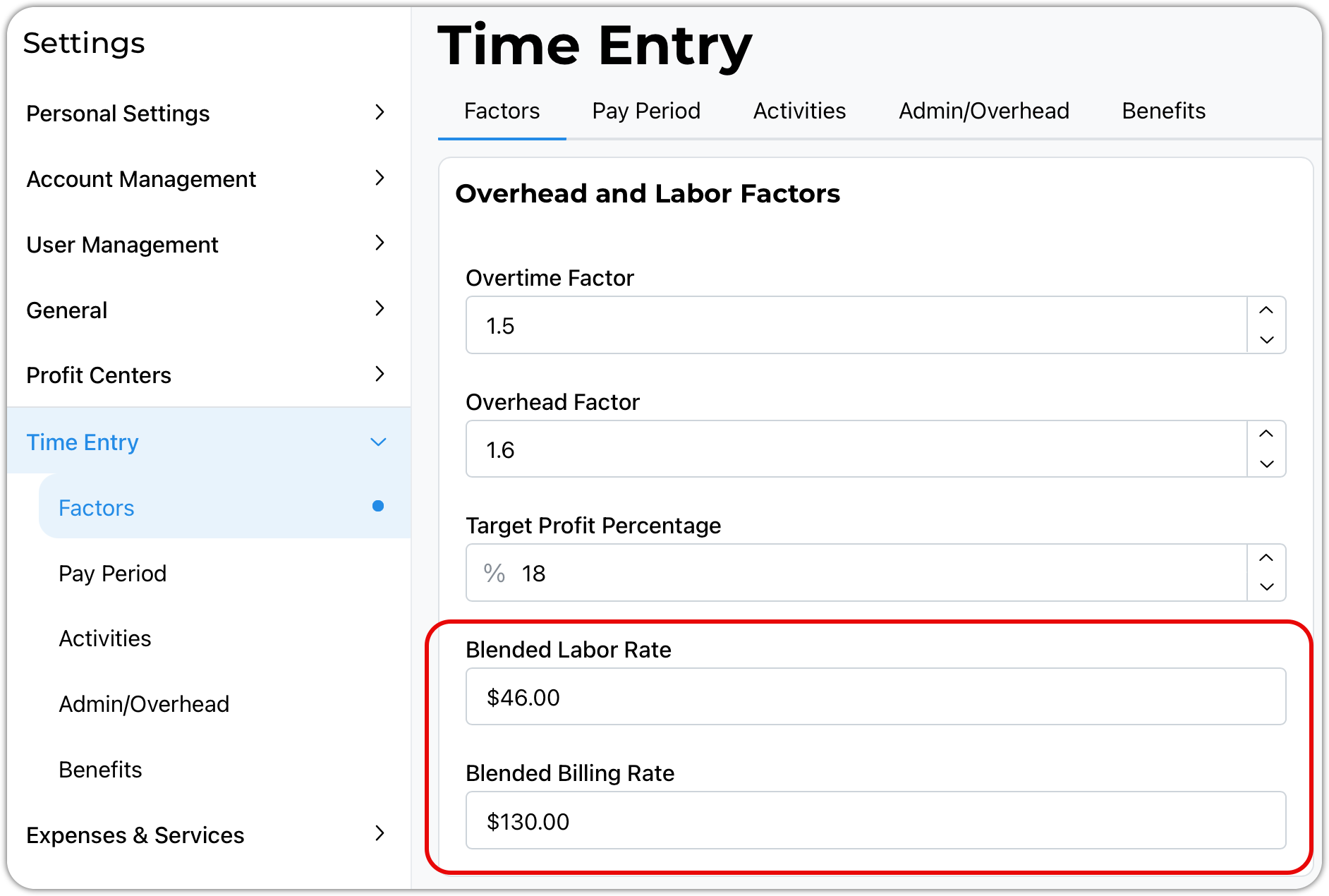
Clicking into either of the blended rate fields will spawn the following table for your review.
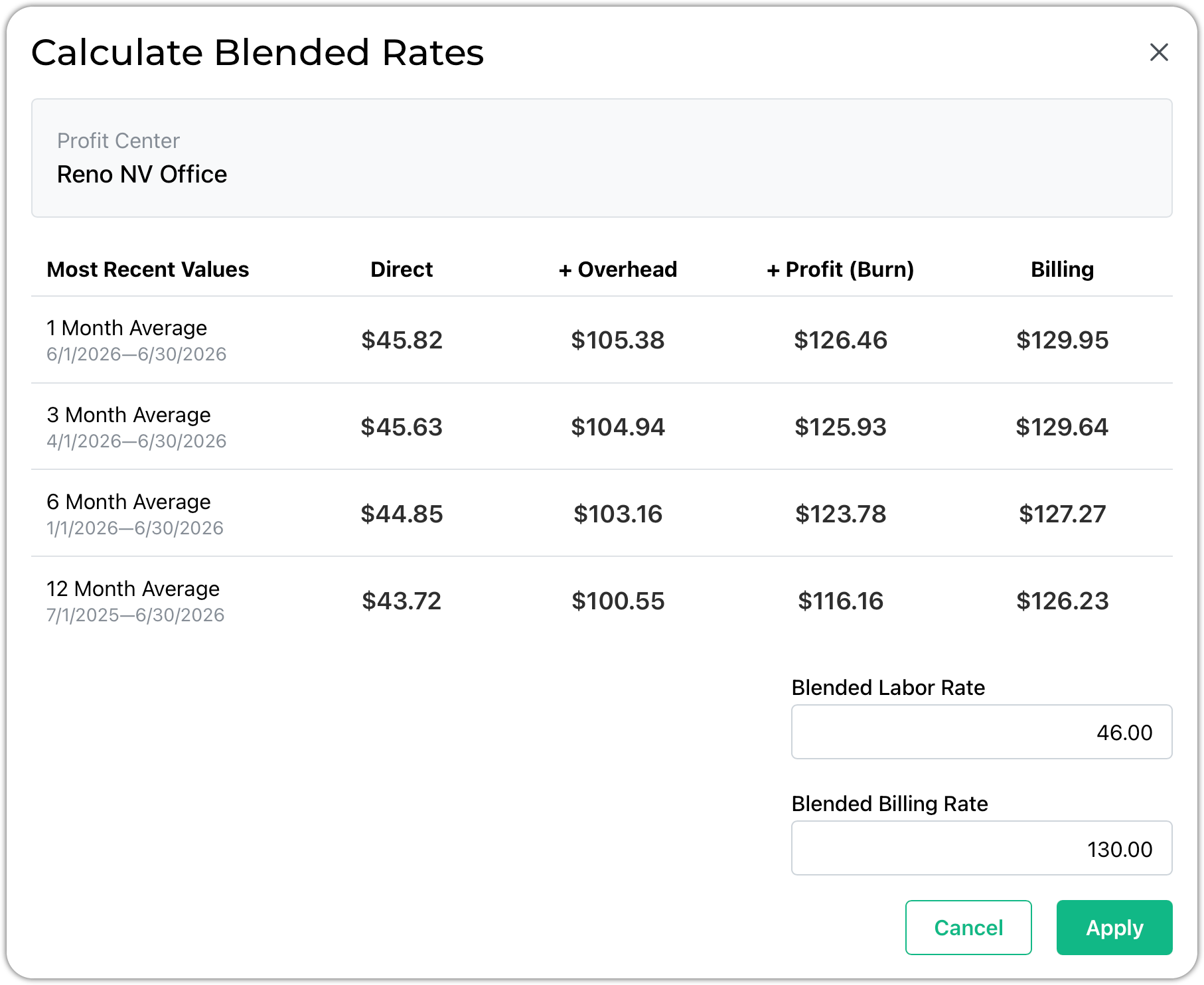
Here is where you will actually enter your blended rates. Each row calculates from project time slips for the given time periods. This gives you real data about your actual operation.
Direct displays the average direct pay rate
+ Overhead is the direct pay rate plus the associated overhead, sometimes called burden
+ Profit (Burn) adds your calculated profit margin to the overhead column
Billing is the average billing rate on the time slips
Redistributing Across Phases
When you change your total hours (for example, entering 2,000 hours where the system previously had 2,500), you can choose to redistribute across your phases. This takes the new total and reallocates it across phases using their existing percentages, rather than requiring you to update each phase by hand.
Calculating Allocations from History
BaseBuilders can also estimate your hour budget using historical time data from the past 12 months (this window is adjustable). Selecting Calculate Allocations cross-references your project's master phases and master billing rates against your logged time, and fills in hours based on what percentage of time has historically gone to each role within each phase.
For this to work, both your phases and billing rates need to be linked to your master phases and master rates:
Blue icons next to the name are linked to a master phase or rate — even if the dollar values differ from the current master rate, the link still works for historical lookback, since it's the role and phase names being matched.
Gray icons are custom and not linked to a master rate or phase — these can't be used for historical calculation.
Because of this, one-off or custom phases (such as a project-specific "Additional Services" phase) can't pull historical data — there's no history to reference. To take full advantage of historical allocation over time, build your projects using master phases and master billing rates whenever possible.
Budgeting by Percentage of Hours
In addition to hours, you can budget using percentage of hours per role. Entering a percentage for a role updates its hours automatically, and vice versa. Just like with phase percentages, your role percentages need to total 100% — if you adjust one role's percentage, you'll need to adjust the others to bring the total back to 100%.
Best Practice
Use master phases and master billing rates on every project you can. Doing so builds a usable history that makes future budgeting fast — instead of manually estimating hours by role, you can let BaseBuilders calculate allocations based on how your firm has actually spent time on similar phases and roles in the past. Reserve custom phases and rates for genuine one-off situations, since they won't benefit from historical lookback.
Summary
Budget hours by phase or by role, using hours, percentages, or a blended billing rate — whichever direction works best for the job. Use the push arrows to move values between hours and role assignments, either row-by-row or across all phases at once. Where possible, build projects on master phases and master billing rates so BaseBuilders can calculate hour allocations automatically based on your firm's historical time data.