

Overview
Access groups allow you to set permissions for multiple users at once, eliminating the need to configure access individually for each user
Most users will need the same access permissions, but you can create one access group per user for granular control if needed
Examples of common access groups: Accounting, Principals, Project Managers, Production, Interns
Managing Access Groups
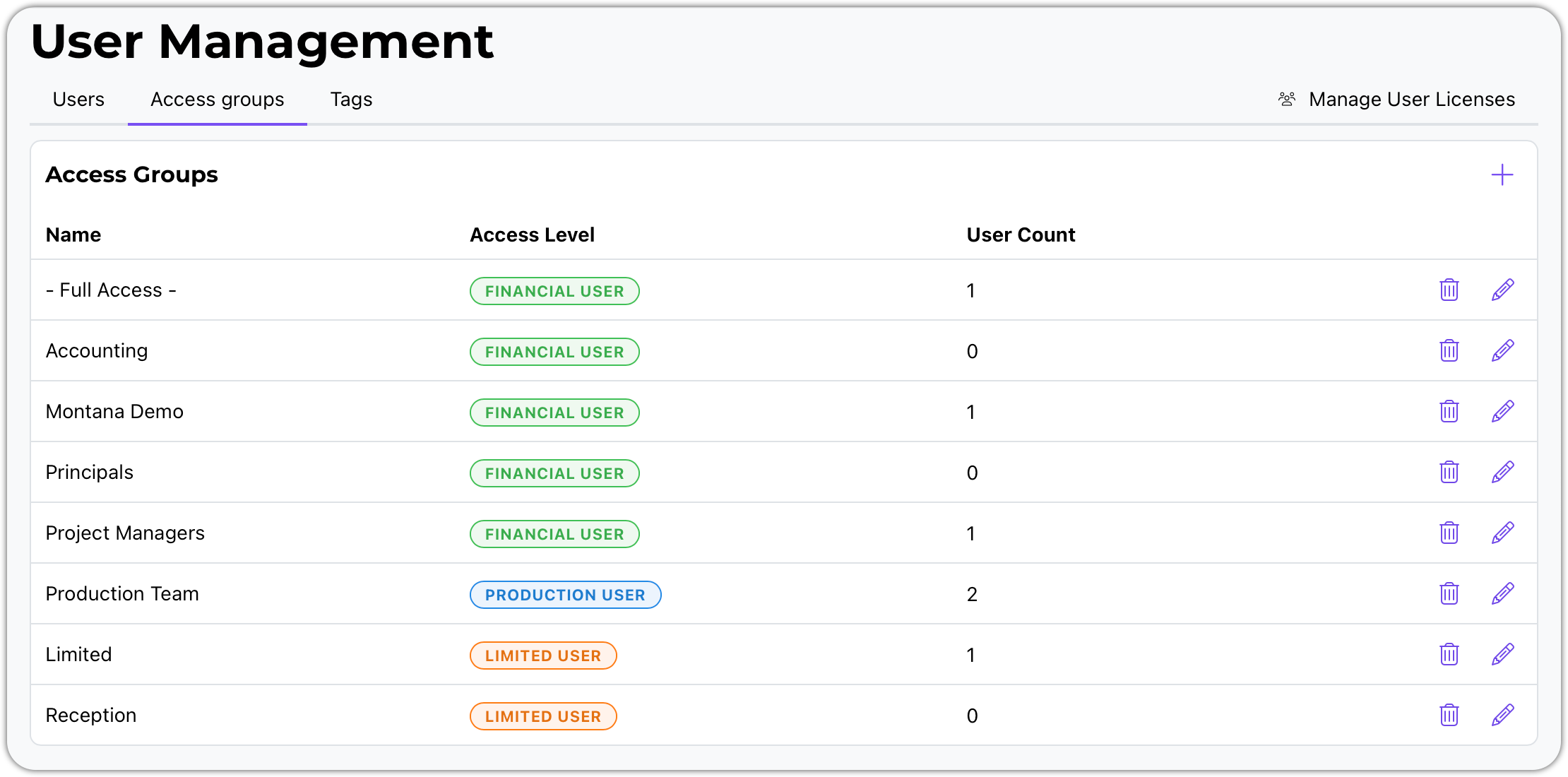
Use the plus (+) sign to create a new access group
Use the delete button to remove an access group
Use the edit button to modify an existing access group
Access Group Types
When creating a new access group, you can choose from three types or levels:
Limited User - minimal module access
Production User - everything but financial data
Financial User - the whole enchilada
The type you select determines which parts of the system you can grant them access to
Permissions by Module for All User Levels - Limited, Production, and Financial
Timesheets
All users will have the ability to create and edit their own time slips
Option: Can also delete their own time slips
Can users view other users' time slips - Not available for limited users
Options: read only | create and edit | create, edit, and delete.
In and Out Board
Can they see everybody or just themselves
Can they edit other users' status - Not available for limited users
Expenses
All users will have the ability to create and edit their own expenses
Option: can also delete their own expenses
Allow users to view other users' expenses - Not available for limited users
Options: read only | create and edit | create, edit, and delete.
Services
All users will have the ability to create and edit their own service items
Option: can also delete their own items
Allow users to view other users' service items - Not available for limited users
Options: read only | create and edit | create, edit, and delete
Todo List
User's own or assigned todos
Options: read only, create and edit, create, edit, and delete
Allow users to view users' todos - Not available for limited users
Options: read only | create and edit | create, edit, and delete
Scheduling and Resources
User's own or assigned schedules
Options: read only, create and edit, create, edit, and delete
Allow users to view users' schedules - Not available for limited users
Options: read only | create and edit | create, edit, and delete
Address Book
View companies and contacts
Options: read only | create and edit | create, edit, and delete
Projects
General Project Data (does not include financial data) - Not available for limited users
All Projects: read only | create and edit
Only assigned Projects: read only | create and edit
This is for Production Level Users
Financial Project Data - Financial Users Only
All projects: read only | create and edit | Create, edit, and delete
Only assigned projects: read only | create and edit | Create, edit, and delete
Proposals
Set permissions for proposal management
Invoices
Can they approve draft invoices?
Can they edit approved invoices?
Income
Configure access to income tracking
Pay Requests
Set permissions for payment request management
Payouts
Configure payout management access
Reports
Controls whether users can create and edit reports or only view reports
You can save special reports in the system as either public or private
Permission options:
Create and edit reports
Read only (cannot modify saved reports)
No access (cannot run saved reports, but can still run quick reports)
Time Reports (time slips)
WARNING: This module contains sensitive pay information
s
Accounting
WARNING: Contains sensitive financial information
Controls access to the accounting module
Determines whether users can access settings for integrating with accounting software
Settings
Purple-colored permissions control access to system settings
Configure which users can modify system configuration
Admin Access
Users must be designated as admin to update access groups
Admin status is required for managing user permissions and access group configurations
Admin users can modify users and access groups in the system
Naming and Customizing Access Groups
You can give access groups any name you like
You can modify the access groups that ship with the system
You can create your own custom access groups
Remember to save changes when editing - use Cancel if you don't want to save modifications
Assigning Users to Access Groups
When working with users (covered in a separate video), you will assign them to access groups
You can have multiple access groups for each user type:
Financial users: Can be assigned to any of the five available financial access groups
Production users: One access group available in this example
Limited users: Two access groups available to choose from
License Types and Access Restrictions
Limited License Users
Limited users have restricted access options
Only a limited number of areas where you can grant them access
When adding a limited license user, you can only pick from the two limited user access groups
Production License Users
Production users have different access options than limited users
Typically, all financial information is removed from production user access
Financial License Users
Financial users have the most comprehensive access options
Can be assigned to any of the five financial user access groups
Key Takeaways
Access groups provide a powerful way to manage user permissions efficiently
You can get very customized on what people can see and what they can do
The system allows granular control - from broad access groups for common roles to individual access groups per user if needed
If you have questions about access groups, please reach out for assistance