

This is where the rubber meets the road. You will likely spend the majority of your time on this template because we want dollar figures so we can reconcile your up-to-date billings.
For older projects, most of our clients create a single phase that represents the entire project. They name the phase with titles like Catching Up, The Whole Enchilada, or All The Marbles. The point of this is so you can run reports that show how much you've contracted for over the past x number of years. Or perhaps by project segment. This comes in handy when writing proposals and resumes.
For your active projects, go ahead and create your full complement of phases. Then we can pick up your ongoing billings where you left off.
Our system will also create a catch-up invoice and a matching income record.
Phases Template.xlsx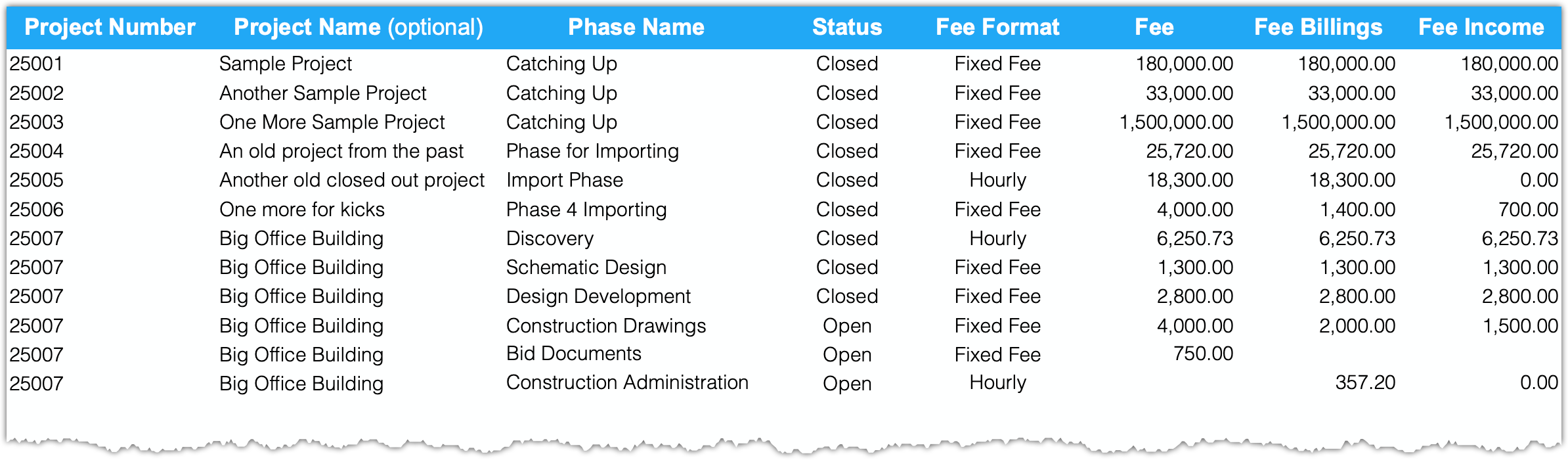
Project Number: This is a must. We use this to tie the phase to the project.
Project Name: (optional) We don't use this piece of data, but it will help you keep track of things as you gather the data for this template.
Phase Name: These names are used on your invoice line items when billing your client.
Status: Users cannot record time or expenses for closed phases. Only open phases and have new transactions tied to them.
Fee Format: These are the two basic formats that we invoice in. You will be able to change the billing format later, but this will get you kick-started.
Fee: This is what you charge your client. For closed hourly phases, it is the total amount billed to date. For open hourly phases, you should set this to your best guess of what your total billings will amount to – don't fret, you can adjust these values at any time down the road.
Fee Billings: This is the total of fee billings that have been issued to your client. This does not include extras like your reimbursable expenses. We are simply attempting to get your fee billings caught up. Our system will generate an invoice for the amount entered here. RELAX - if you happen to make a mistake, you will be able to go in and edit this catch-up invoice.
Fee Income: In most cases, this will match the amount from the prior column. If the amount you enter is less than your invoiced amount, you will end up with a balance due. By now, you have figured out that our system will create an income record and apply the amount against the matching invoice. Just like anything else in our system, if you made an error on an item or two, you will be able to go in and make updates.
Need assistance? Schedule a Call